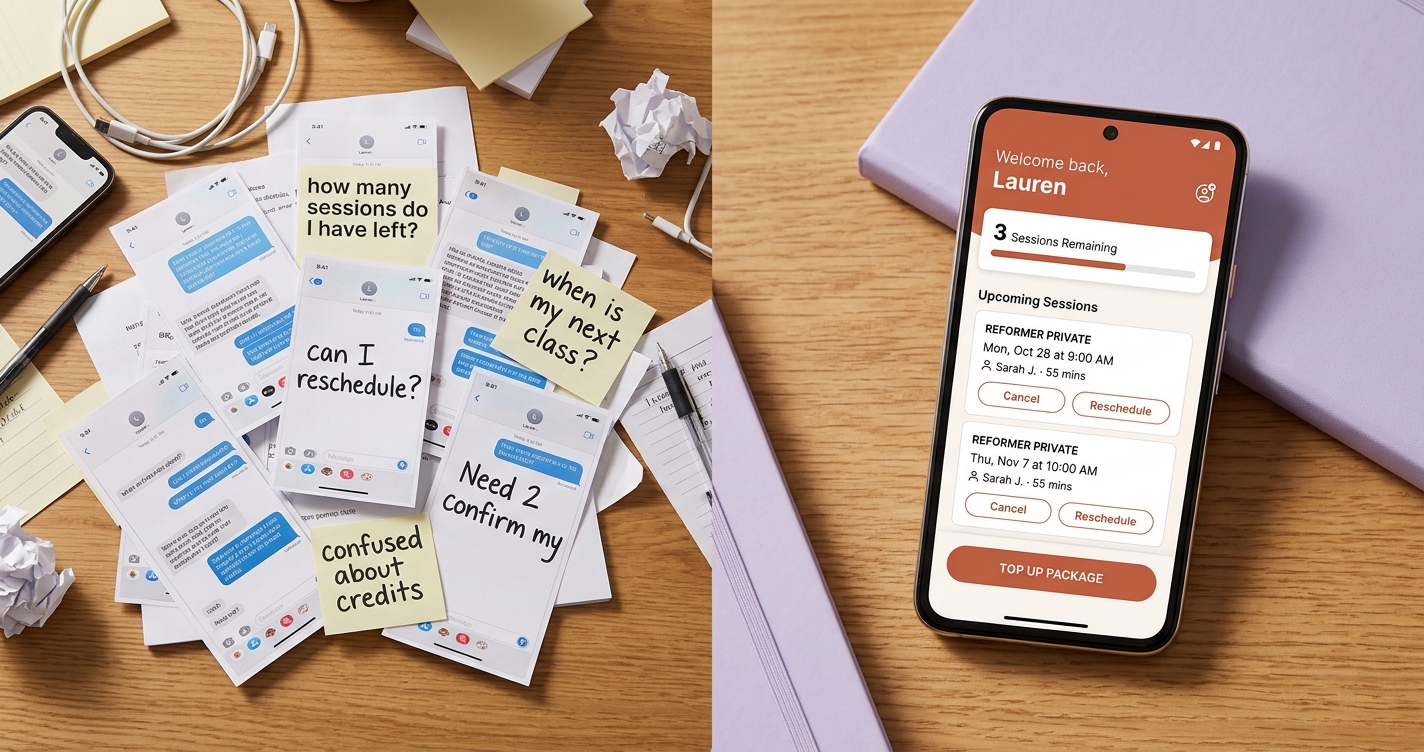
If you run a small fitness studio, you already know the drill. Your phone buzzes at 7 AM: "Hey, how many sessions do I have left?" By noon you have three more texts asking the same thing. Someone wants to cancel Thursday's class. Another client wants to rebook for next week. And somewhere in between, you are trying to actually teach.
This is the reality for most independent studio owners. You became an instructor because you love the work, not because you wanted to spend your evenings cross-referencing spreadsheets and answering the same questions on repeat.
A studio client portal can change that entirely.
What Is a Client Self-Service Portal?
A client self-service portal is a private, login-protected area where your members can manage their own studio experience. Think of it as a personal dashboard for each client -- a place where they can see their remaining sessions, view upcoming bookings, book or cancel classes, and review their payment history.
Instead of texting you to ask "do I have any sessions left?" they simply open their portal and see the answer. Instead of sending you a DM to cancel a Thursday class, they tap a button and it is done.
The key word here is self-service. The portal does not replace you -- it handles the repetitive administrative tasks so you can focus on what matters: running great classes and building relationships with your clients.
The Problem: Your Phone Has Become Your Front Desk
Small studio owners wear every hat. You are the instructor, the scheduler, the bookkeeper, and the customer support team. When your primary communication channel with clients is text messages and Instagram DMs, a few things start to happen:
You lose track of conversations. A client texted you last Tuesday about rescheduling. Did you reply? Did you actually move the booking? You scroll back through a hundred messages trying to find the thread.
Clients do not know where they stand. They bought a 10-session package two months ago. They think they have used six sessions but are not sure. You think they have used seven. Neither of you has a clean record, so you end up giving the benefit of the doubt -- and quietly losing revenue.
Cancellations happen too late. A client decides at 9 PM they cannot make tomorrow's 6 AM class. They text you, but you are already asleep. You wake up to an empty slot that could have been filled.
None of this is anyone's fault. It is simply what happens when a growing studio runs on informal communication. A self-service booking portal replaces that chaos with structure -- without making things feel corporate or impersonal.
What a Good Studio Client Portal Should Include
Not every portal is created equal. If you are evaluating options or building out your own setup, here are the features that actually matter for small fitness studios:
Remaining sessions at a glance. This is the single most valuable feature. When clients can see "4 of 10 sessions remaining" the moment they log in, it eliminates the most common question you receive. It also creates a natural prompt for them to purchase their next package before the current one runs out.
Upcoming bookings. Clients should see a clear list of what they have booked, including dates, times, and class types. No ambiguity, no need to check with you.
Self-service booking and cancellation. Let clients book open slots and cancel within your cancellation policy window -- all without a single text message. You set the rules (how far in advance they can cancel, which slots are available), and the portal enforces them automatically.
Payment and package history. A record of what they have purchased and when. This builds trust and reduces disputes. Clients appreciate transparency around their spending, and you benefit from having a clean paper trail.
Mobile-friendly design. Your clients are not sitting at desks. They are checking their schedules between errands, on the train, or right after a workout. The portal needs to work beautifully on a phone -- not just technically function, but feel natural to use.
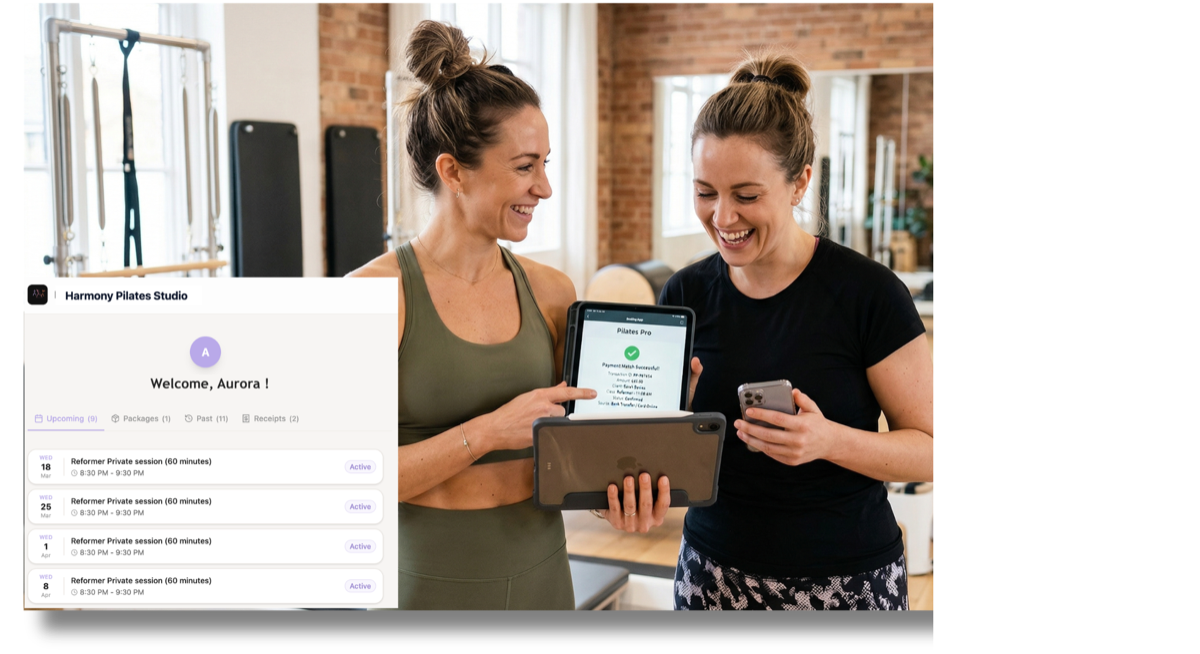 The BookYourMat client portal -- clients see their sessions, upcoming bookings, and payment history in a clean, mobile-friendly interface branded to your studio.
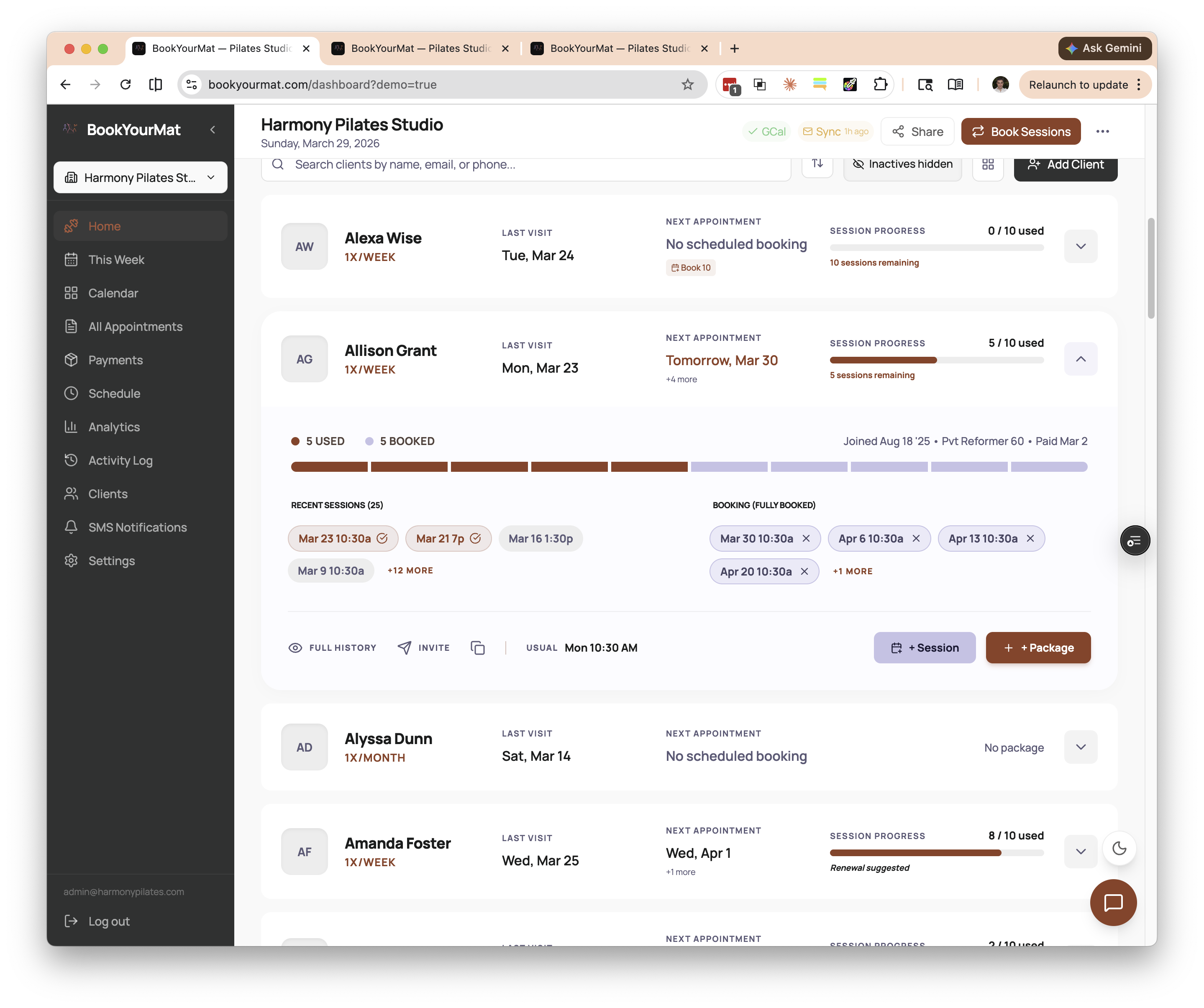 Each client's profile shows their remaining sessions at a glance -- the exact information they would otherwise text you to ask about.
Benefits for You as a Studio Owner
The most immediate benefit is time. Every question a client can answer themselves is a question you do not have to answer. For a studio with 30 to 50 active clients, this can easily save several hours per week.
But there are less obvious benefits too:
Fewer no-shows. When clients can see their bookings and cancel easily within your policy window, they are more likely to cancel in advance rather than simply not showing up. That gives you time to fill the slot or adjust your schedule.
A more professional impression. A branded portal signals to clients that your studio is well-run and established. It differentiates you from instructors who manage everything through WhatsApp groups. For prospective clients comparing options, that professionalism can be the tipping point.
Better cash flow visibility. When package balances and payment history are tracked automatically, you stop second-guessing who owes what. You can see at a glance which clients are running low on sessions and might be ready for a renewal conversation.
Less mental overhead. This one is hard to quantify but easy to feel. When you are not carrying a mental to-do list of "reply to Sarah about her sessions, check if Mike paid, confirm Thursday with Dana," you have more energy for the work you actually enjoy.
Benefits for Your Clients
Self-service is not just convenient for you -- clients genuinely prefer it. Most people would rather check an app than send a text and wait for a reply. A client self-service fitness portal gives them:
Instant answers. No waiting for you to check your records. They open the portal and see exactly where they stand.
Control over their schedule. They can browse available slots and book what works for them, rather than going back and forth with you to find a time.
Transparency. Seeing their full payment and session history builds confidence that everything is being tracked accurately. It removes the awkwardness of "I think I paid for that already" conversations.
Respect for their time. A well-designed portal says: "We value your time enough to make this easy." That matters to busy professionals who are fitting studio sessions into packed schedules.
How to Roll Out a Portal to Existing Clients
If you have been running your studio on text messages for months or years, introducing a portal requires a bit of thoughtfulness. Here is what works:
Start with an invitation, not a mandate. Send each client a personal message with their portal link. Frame it as something you have built for them: "I set up a personal dashboard for you where you can check your sessions and book classes anytime."
Make the first experience rewarding. When a client logs in for the first time, they should immediately see something useful -- their remaining sessions, their next booking. If the portal is empty or confusing on first visit, they will not come back.
Keep texting available during the transition. Do not cut off the old way of doing things overnight. Let clients adopt the portal at their own pace. Over a few weeks, most will naturally shift because the portal is simply easier.
Mention it in class. A quick "remember, you can check your sessions and book your next class through your portal" after a session is a gentle, effective reminder.
How BookYourMat Handles This
BookYourMat includes a branded client portal designed specifically for small studios. Each client gets their own login where they can see remaining sessions across all their packages, view upcoming bookings, and review their history. The portal is mobile-friendly and carries your studio's branding, so it feels like a natural extension of your business rather than a third-party tool.
Because BookYourMat is built around how independent instructors actually work -- packages with session counts, mixed group and private clients, flexible scheduling -- the portal reflects the way your studio already operates. There is no need to restructure your offerings to fit the software.
Ready to Stop Being Your Studio's Help Desk?
If you are spending more time answering client questions than teaching classes, a self-service portal is one of the highest-impact changes you can make. It does not require a big technology overhaul or a change in how you run your studio. It simply gives your clients a window into the information they are already asking you for.
You can explore how BookYourMat's client portal works at bookyourmat.com -- or reach out if you want to see it in action with your own studio's branding.