
If you run a small pilates, yoga, or fitness studio, there is a good chance a significant portion of your clients already pay you through Venmo or PayPal. These peer-to-peer platforms have become the default way many people send money, and for good reason. They are fast, familiar, and require zero hardware on your end. But while accepting Venmo and PayPal studio payments is easy, keeping track of them is another story entirely.
This guide walks through why these platforms work well for small studios, where the pain points are, and how modern studio payment management tools can eliminate the manual tracking that eats into your evenings and weekends.
Why Venmo and PayPal Work for Small Studios
Large gym chains can justify the cost and complexity of integrated POS systems, dedicated payment terminals, and enterprise billing software. Small studios operate differently. You might have between 15 and 60 active clients, one or two instructors, and a schedule that changes week to week. In that environment, Venmo and PayPal have real advantages.
First, there is no equipment to buy or maintain. A client can pay you from the parking lot before class or from their couch on Sunday night. There is no card reader to troubleshoot, no terminal to reboot. Second, your clients already have these apps on their phones. You are not asking anyone to download something new or create yet another account. Third, the money moves quickly. Venmo and PayPal transfers typically land in your bank account within one to three business days, and instant transfer options are available for a small fee.
For studios that sell session packages -- ten group classes for a set price, or four private sessions -- peer-to-peer payments are a natural fit. The client sends the package price, you confirm receipt, and sessions begin. Simple in theory.
The Real Problem: Tracking Who Paid for What
The trouble starts the moment you have more than a handful of clients. A typical week might look like this: Sarah sends $320 on Venmo with the note "10 pack," Jessica's husband pays from his PayPal account with no note at all, two clients named Maria both send payments on the same day, and someone pays half now with a promise to send the rest next week.
Now multiply that across a month. You are cross-referencing Venmo notifications, PayPal transaction emails, your class schedule, and a spreadsheet (or notebook, or text file) trying to answer basic questions. Who has paid? How many sessions does each client have left? Did that payment actually come through, or did you just see the notification and forget to check?
This manual reconciliation is where studio owners lose hours every week. It is also where mistakes happen -- giving a client an extra session they did not pay for, or worse, telling a paying client they owe money when they have already sent it. Neither situation is good for your business or your client relationships.
How Payment-Matching Software Changes the Game
This is the problem that modern studio management platforms are built to solve. Instead of manually checking each Venmo and PayPal notification against your client list, payment-matching software monitors your connected accounts and automatically detects incoming payments.
Here is how it works in practice. When a client sends a Venmo or PayPal payment to your studio account, the software detects the transaction through your linked bank feed or email notifications. It then matches the payment to a client in your system using the sender's name, email, or phone number. Once matched, the software automatically creates or tops up the client's session package -- adding ten group sessions or four private sessions based on the amount paid and your configured package types.
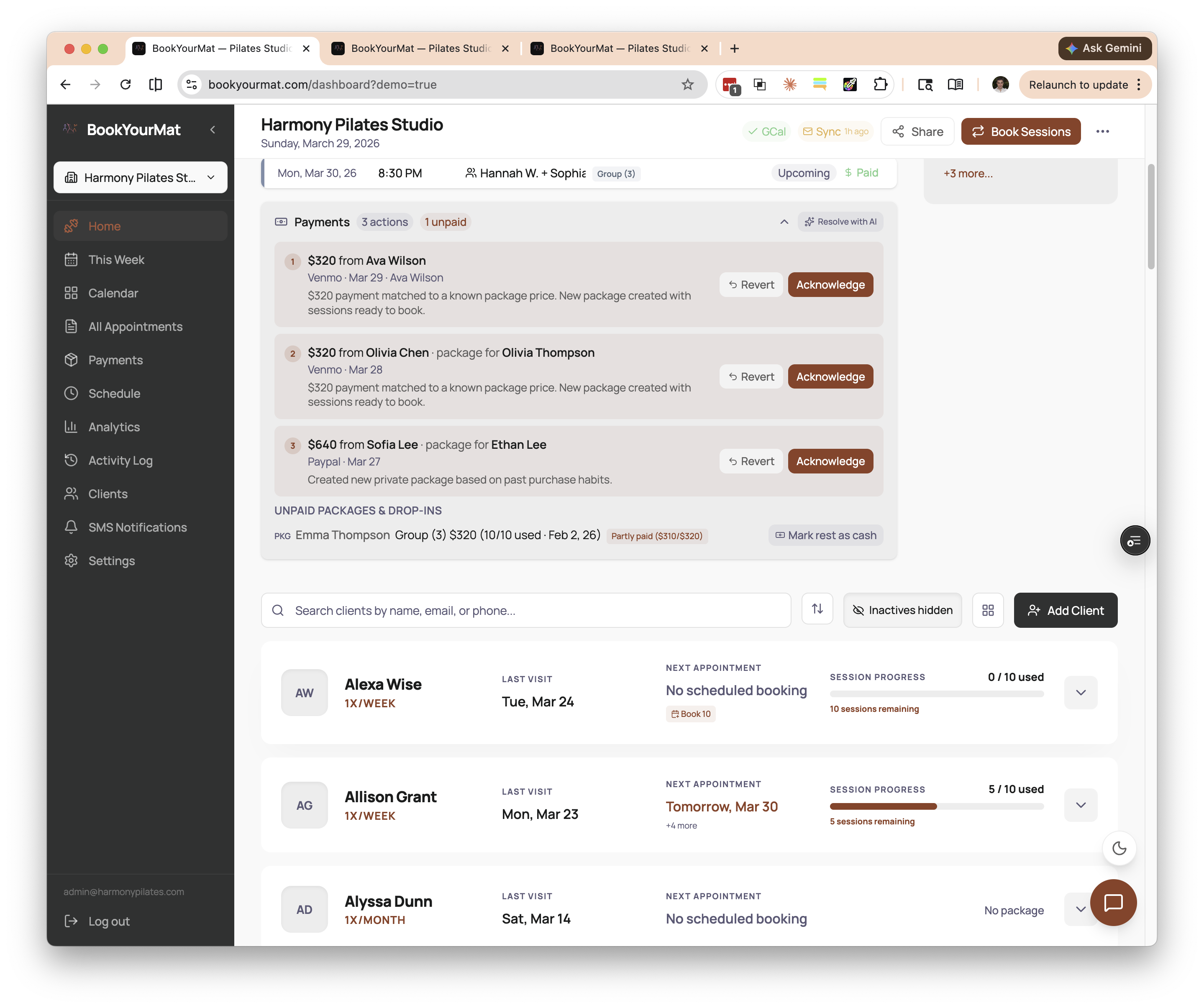 Auto-matched payments on the BookYourMat dashboard -- each incoming Venmo or PayPal transfer is linked to the right client with one-click confirmation.
The result is that your client roster stays current in real time. You can glance at your dashboard before a class and see exactly how many sessions each person has remaining, without opening Venmo, scrolling through your bank statement, or updating a spreadsheet. When a client asks "how many sessions do I have left?" you have the answer immediately.
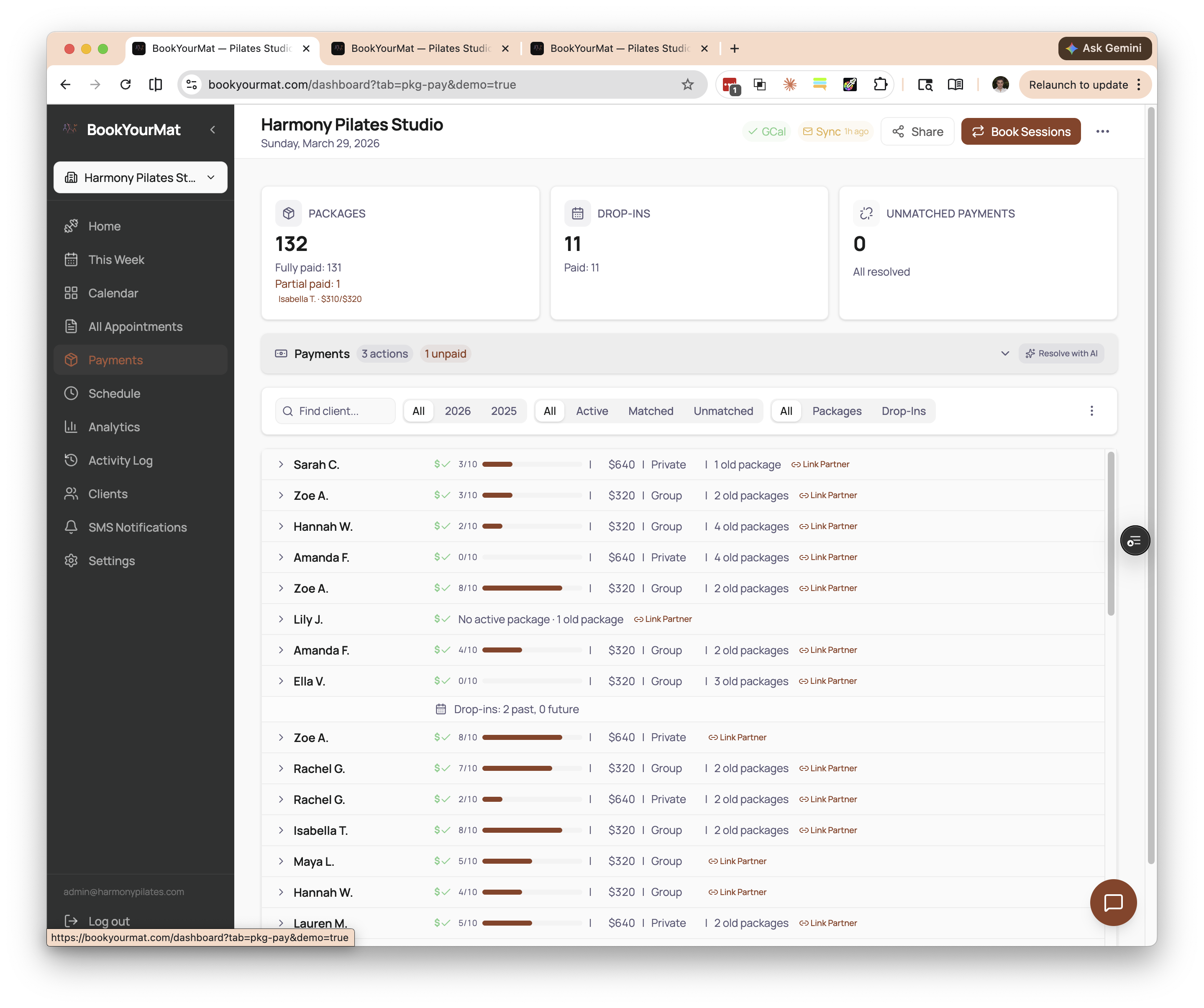 The payments view shows exactly who has paid, which package they purchased, and how their sessions are tracking -- all updated automatically.
For edge cases -- a payment from an unrecognized name, an unusual amount, or a note that does not match any package -- the software flags the transaction for your review rather than guessing. You handle the exceptions; the system handles everything else.
Tips for Setting Up a Smooth Payment Flow
If you are ready to streamline how you accept Venmo studio payments and PayPal transfers, a few practices will make the transition smoother.
Standardize your package prices. When every group package is exactly $320 and every private package is exactly $640, payment-matching software can confidently identify what a client is buying based on the amount alone. Odd or variable amounts create ambiguity.
Ask clients to use consistent names. If a client's Venmo display name is "J-Money" but they are listed in your system as Jennifer Martinez, automatic matching becomes harder. A quick message to your clients asking them to include their full name in the payment note goes a long way.
Pick one receiving account per platform. Avoid splitting incoming payments across multiple Venmo or PayPal accounts. One account per platform keeps your transaction history clean and gives your software a single source to monitor.
Set clear payment timing expectations. Let clients know when payment is expected -- before the first session of a new package, for example. This reduces the back-and-forth of chasing payments and keeps your books predictable.
Keep your client list current. Archive inactive clients and make sure new clients are added to your system before their first payment arrives. A clean client list means fewer unmatched transactions to review manually.
Common Concerns: Fees, Disputes, and Tracking
What about transaction fees? Venmo charges no fee for payments sent from a bank account or debit card using a personal account. PayPal's fees depend on whether you use a personal or business account and the payment method. Business accounts typically incur a per-transaction fee. Venmo Business Profile fees (1.9% + $0.10) are typically lower than credit card processing rates. PayPal's fees vary by method -- their in-person QR code rate is competitive, while their online checkout fees can exceed standard credit card rates. Review each platform's current fee schedule to understand what applies to your setup.
It's worth noting that Venmo's terms of service require businesses to use a Venmo Business Profile for commercial transactions, which incurs a 1.9% + $0.10 fee per payment received. Using a personal account for business payments risks account suspension. Review Venmo's current terms before setting up your payment flow.
What if a client disputes a payment? Disputes on Venmo and PayPal are uncommon in a studio context because both parties know each other. That said, it is good practice to keep records of what each payment was for. Software that logs the payment amount, date, sender, and associated package gives you a clear paper trail if questions arise.
Can I still accept other payment methods? Absolutely. Most studios accept a mix of Venmo, PayPal, Zelle, checks, cash, and increasingly credit cards. The key is having a system that can track payments regardless of how they arrive, so you are not maintaining separate records for each method.
Is it professional enough? Some studio owners worry that Venmo feels too casual. In practice, clients overwhelmingly prefer the convenience. What feels unprofessional is not the payment method -- it is the follow-up text asking "hey, did you pay yet?" because you lost track. A system that confidently tracks every payment, however it arrives, is what creates a professional experience.
Stop Chasing Payments, Start Running Your Studio
The work you love is teaching, coaching, and building a community around movement. The work you tolerate is bookkeeping, payment tracking, and reconciliation. The less time you spend on the latter, the more energy you have for the former.
BookYourMat was built specifically for small studio owners who accept payments through Venmo, PayPal, and other peer-to-peer platforms. It automatically detects incoming payments, matches them to your clients, and keeps session packages up to date -- so you always know who has paid and how many sessions they have left. If you are tired of spreadsheets and manual tracking, take a look at what BookYourMat can do for your studio.